PHP 使用 TCPDF 製作並產生 PDF 報表 [使用USBWebserver_v8.6測試成功]
PHP 使用 TCPDF 製作並產生 PDF 報表 [使用USBWebserver_v8.6測試成功]
資料來源: https://www.footmark.info/programming-language/php/php-tcpdf-pdf-report/
https://github.com/tecnickcom/TCPDF
GITHUB: https://github.com/jash-git/Jash-good-idea-20220101-001/tree/main/PHP%20%E4%BD%BF%E7%94%A8%20TCPDF%20%E8%A3%BD%E4%BD%9C%E4%B8%A6%E7%94%A2%E7%94%9F%20PDF%20%E5%A0%B1%E8%A1%A8
Code:
<?php
	date_default_timezone_set("Asia/Taipei");
	// Include the main TCPDF library (search for installation path).
	require_once('TCPDF/tcpdf.php');

	// Extend the TCPDF class to create custom Header and Footer
	// 自訂頁首與頁尾
	class MYPDF extends TCPDF {
		//Page header
		public function Header() {
			// Set font
			$this->SetFont('msungstdlight', '', 10);

			// 公司與報表名稱
			$title = '
	<h4 style="font-size: 20pt; font-weight: normal; text-align: center;">MIS 腳印股份有限公司</h4>
	<table>
		<tr>
			<td style="width: 30%;"></td>
			<td style="border-bottom: 2px solid black; font-size: 20pt; font-weight: normal; text-align: center; width: 40%;">員工基本資料</td>
			<td style="width: 30%;"></td>
		</tr>
		<tr>
			<td colspan="3"></td>
		</tr>
	</table>';


			/**
			 * 標題欄位
			 *
			 * 所有欄位的 width 設定值均與「資料欄位」互相對應,除第一個 <td> width 須向左偏移 5px,才能讓後續所有「標題欄位」與「資料欄位」切齊
			 * 最後一個 <td> 必須設定 width: auto;,才能將剩餘寬度拉至最寬
			 * style 屬性可使用 text-align: left|center|right; 來設定文字水平對齊方式
			 */

			$fields = '
	<table cellpadding="1">
		<tr>
			<td style="border-bottom: 1px solid black; width: 95px;"> ID</td>
			<td style="border-bottom: 1px solid black; width: 90px;">Name</td>
			<td style="border-bottom: 1px solid black; width: 90px;">Sex</td>
			<td style="border-bottom: 1px solid black; width: 90px;">Birthday</td>
			<td style="border-bottom: 1px solid black; width: 90px;">Tel</td>
			<td style="border-bottom: 1px solid black; width: 90px;">Mobile</td>
			<td style="border-bottom: 1px solid black; width: auto;">Address</td>
		</tr>
	</table>';

			// 設定不同頁要顯示的內容 (數值為對應的頁數)
			switch ($this->getPage()) {
				case '1':
					// 設定資料與頁面上方的間距 (依需求調整第二個參數即可)
					$this->SetMargins(1, 50, 1);

					// 增加列印日期的資訊
					$html = $title . '
	<table cellpadding="1">
		<tr>
			<td>列印日期:' . date('Y-m-d') . ' ' . date('H:i') . '</td>
			<td></td>
			<td></td>
		</tr>
		<tr>
			<td colspan="3"></td>
		</tr>
	</table>' .  $fields;
					break;
				// 其它頁
				default:
					$this->SetMargins(1, 40, 1);
					$html = $title . $fields;
			}

			// Title
			$this->writeHTMLCell(0, 0, '', '', $html, 0, 1, 0, true, '', true);
		}

		// Page footer
		public function Footer() {
			// Position at 15 mm from bottom
			$this->SetY(-15);
			// Set font
			$this->SetFont('helvetica', 'I', 8);
			// Page number
			$this->Cell(0, 10, 'Page '.$this->getAliasNumPage().'/'.$this->getAliasNbPages(), 0, false, 'R', 0, '', 0, false, 'T', 'M');
		}
	}

	// create new PDF document
	$pdf = new MYPDF(PDF_PAGE_ORIENTATION, PDF_UNIT, PDF_PAGE_FORMAT, true, 'UTF-8', false);

	// set document information
	$pdf->SetCreator(PDF_CREATOR);
	$pdf->SetAuthor('Nicola Asuni');
	$pdf->SetTitle('MIS 腳印 - 員工基本資料');
	$pdf->SetSubject('TCPDF Tutorial');
	$pdf->SetKeywords('TCPDF, PDF, example, test, guide');

	// set default header data
	$pdf->SetHeaderData(PDF_HEADER_LOGO, PDF_HEADER_LOGO_WIDTH, PDF_HEADER_TITLE.' 001', PDF_HEADER_STRING, array(0,64,255), array(0,64,128));
	$pdf->setFooterData(array(0,64,0), array(0,64,128));

	// set header and footer fonts
	$pdf->setHeaderFont(Array(PDF_FONT_NAME_MAIN, '', PDF_FONT_SIZE_MAIN));
	$pdf->setFooterFont(Array(PDF_FONT_NAME_DATA, '', PDF_FONT_SIZE_DATA));

	// set default monospaced font
	$pdf->SetDefaultMonospacedFont(PDF_FONT_MONOSPACED);

	// set margins
	// 版面配置 > 邊界
	// $pdf->SetMargins(PDF_MARGIN_LEFT, PDF_MARGIN_TOP, PDF_MARGIN_RIGHT);
	$pdf->SetMargins(1, 1, 1);

	// 頁首上方與頁面頂端的距離
	$pdf->SetHeaderMargin(PDF_MARGIN_HEADER);
	// 頁尾上方與頁面底端的距離
	$pdf->SetFooterMargin(PDF_MARGIN_FOOTER);

	// set auto page breaks
	// 自動分頁
	$pdf->SetAutoPageBreak(TRUE, PDF_MARGIN_BOTTOM);

	// set image scale factor
	$pdf->setImageScale(PDF_IMAGE_SCALE_RATIO);

	// set some language-dependent strings (optional)
	if (@file_exists(dirname(__FILE__).'/lang/eng.php')) {
		require_once(dirname(__FILE__).'/lang/eng.php');
		$pdf->setLanguageArray($l);
	}

	// ---------------------------------------------------------

	// set default font subsetting mode
	$pdf->setFontSubsetting(true);

	// Set font
	// dejavusans is a UTF-8 Unicode font, if you only need to
	// print standard ASCII chars, you can use core fonts like
	// helvetica or times to reduce file size.
	// $pdf->SetFont('dejavusans', '', 14, '', true);
	// 中文字體名稱, 樣式 (B 粗, I 斜, U 底線, D 刪除線, O 上方線), 字型大小 (預設 12pt), 字型檔, 使用文字子集
	$pdf->SetFont('msungstdlight', '', 10);

	// Add a page
	// This method has several options, check the source code documentation for more information.
	// 版面配置:P 直向 | L 橫向, 紙張大小 (必須大寫字母)
	$pdf->AddPage('P', 'LETTER');

	// set text shadow effect
	// 文字陰影
	// $pdf->setTextShadow(array('enabled'=>true, 'depth_w'=>0.2, 'depth_h'=>0.2, 'color'=>array(196,196,196), 'opacity'=>1, 'blend_mode'=>'Normal'));

	// Set some content to print
	// $html = <<<EOD
	// <h1>Welcome to <a href="http://www.tcpdf.org" style="text-decoration:none;background-color:#CC0000;color:black;"> <span style="color:black;">TC</span><span style="color:white;">PDF</span> </a>!</h1>
	// <i>This is the first example of TCPDF library.</i>
	// <p>This text is printed using the <i>writeHTMLCell()</i> method but you can also use: <i>Multicell(), writeHTML(), Write(), Cell() and Text()</i>.</p>
	// <p>Please check the source code documentation and other examples for further information.</p>
	// <p style="color:#CC0000;">TO IMPROVE AND EXPAND TCPDF I NEED YOUR SUPPORT, PLEASE <a href="http://sourceforge.net/donate/index.php?group_id=128076">MAKE A DONATION!</a></p>
	// EOD;

	for ($i = 0; $i < 50; $i++) {
		/**
		 * 資料欄位
		 *
		 * 所有欄位的 width 設定值均與「標題欄位」互相對應,除第一個 <td> width 須 -5px
		 * 最後一個 <td> 必須設定 width: auto;,才能將剩餘寬度拉至最寬
		 * style 屬性可使用 text-align: left|center|right; 來設定文字水平對齊方式
		 */

		$html .= '
			<tr>
				<td style="line-height: 1.5; width: 90px;">102050' . $i . '</td>
				<td style="line-height: 1.5; width: 90px;">王' . $i . '傑</td>
				<td style="line-height: 1.5; width: 90px;">M</td>
				<td style="line-height: 1.5; width: 90px;">72-11-16</td>
				<td style="line-height: 1.5; width: 90px;">06-2600000</td>
				<td style="line-height: 1.5; width: 90px;">0952000000</td>
				<td style="line-height: 1.5; width: auto;">台南市安平區健康三街</td>
			</tr>';
	}

	$html = '
	<table cellpadding="1">' . $html . '</table>';

	$pdf->writeHTMLCell(0, 0, '', '', $html, 0, 1, 0, true, '', true);

	// ---------------------------------------------------------

	// Close and output PDF document
	// This method has several options, check the source code documentation for more information.
	// 下載 PDF 的檔案名稱 (不可取中文名,即使有也會自動省略中文名)

	ob_end_clean();//克服 『TCPDF ERROR: Some data has already been output, can't send PDF file』by jash.liao
	$pdf->Output(__DIR__ .'mis-employees.pdf', 'I');//增加『__DIR__ .』克服 未指定目錄 by jash.liao
?>
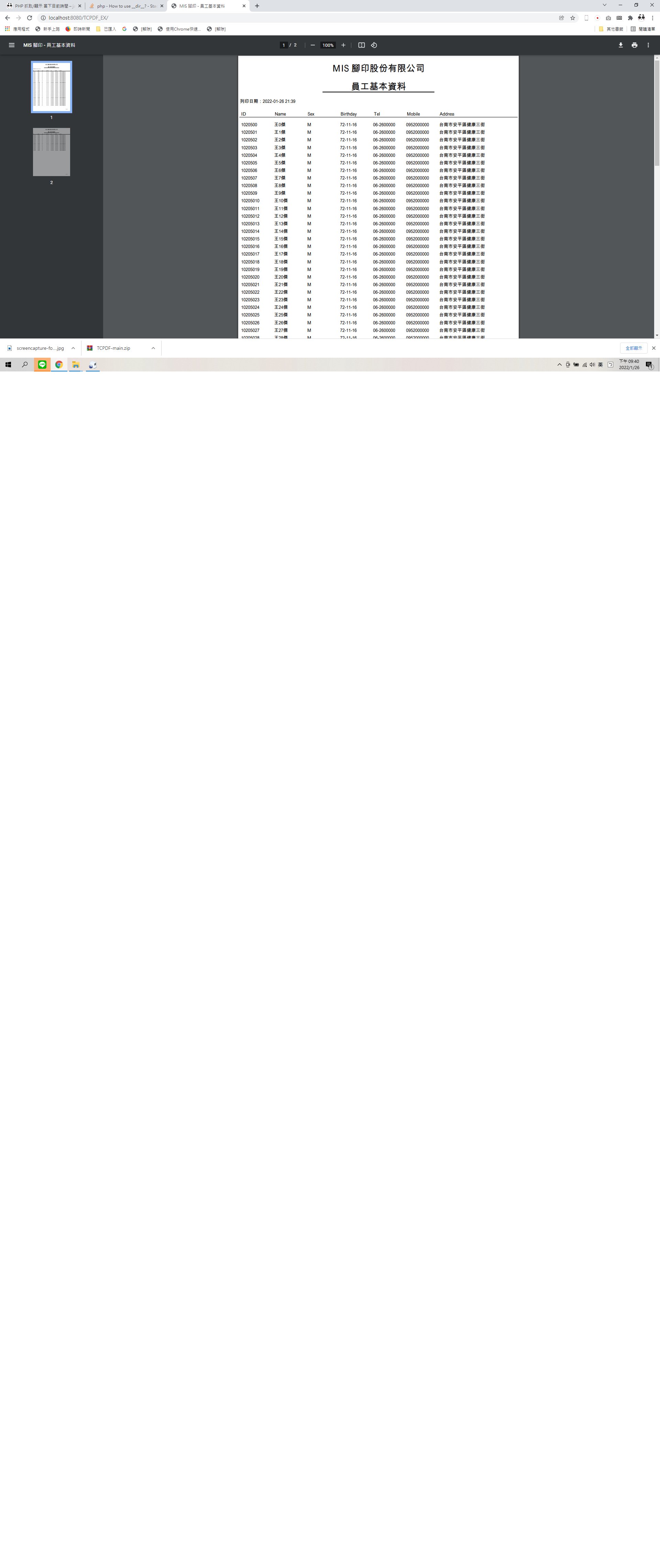
實測結果圖:
One thought on “PHP 使用 TCPDF 製作並產生 PDF 報表 [使用USBWebserver_v8.6測試成功]”
完整原廠線上範例/和對應結果展示
https://tcpdf.org/examples/